亚马逊 Related Products 数据:选品竞品分析的隐藏金矿
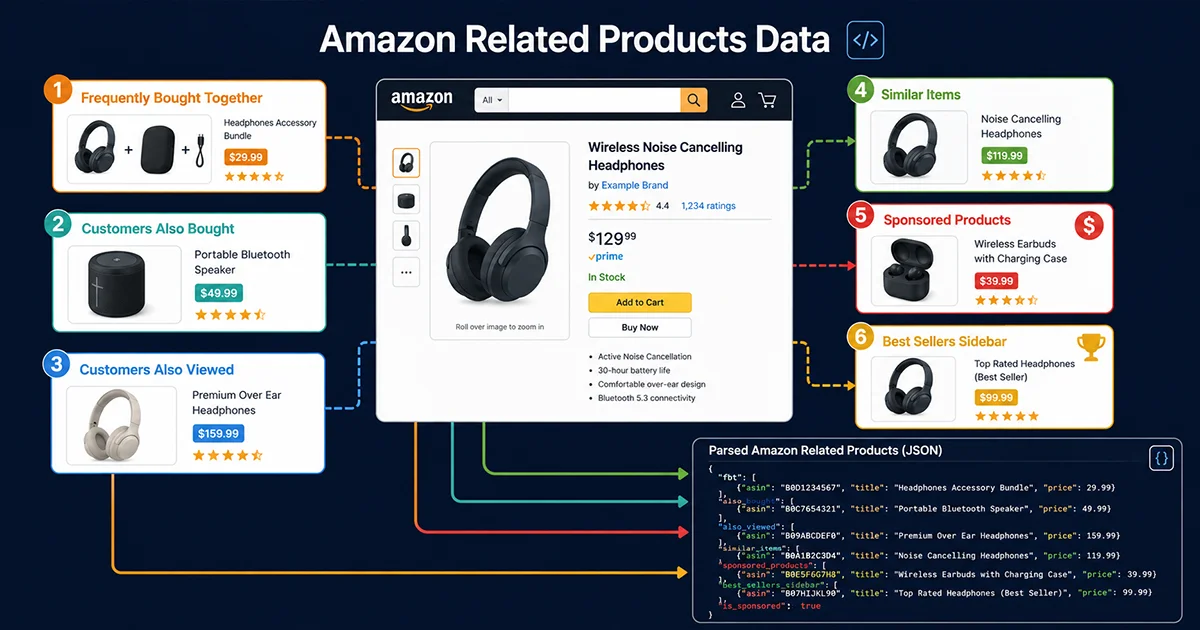
亚马逊 Related Products 数据是许多卖家工具和数据平台忽视的一个数据层。在产品详情页上,亚马逊实际上同时展示了六种不同维度的关联商品——每一种背后代表的是不同的用户行为信号、算法推荐逻辑,以及完全不同的商业价值。根据 Jungle Scout 2025 年报告,超过 35% 的亚马逊购买决策受到关联推荐模块的影响;而对于卖家来说,系统性分析竞品的关联网络,是发现蓝海选品机会和优化广告投放的有效路径。
这篇文章的定位很明确:不是泛谈「如何爬亚马逊」,而是专门针对 Related Products 的六大模块,逐一拆解 HTML 结构、渲染机制、采集难点和数据字段,附上完整的 Python 代码实现,并分析每个模块数据在实际业务中的应用价值。
亚马逊关联商品六大模块,你真的分得清吗?
在开始写采集代码之前,有必要先搞清楚亚马逊页面上的「关联商品」到底有多少种,它们分别代表什么算法逻辑——因为这决定了数据价值和采集策略。
模块一:Frequently Bought Together(FBT)
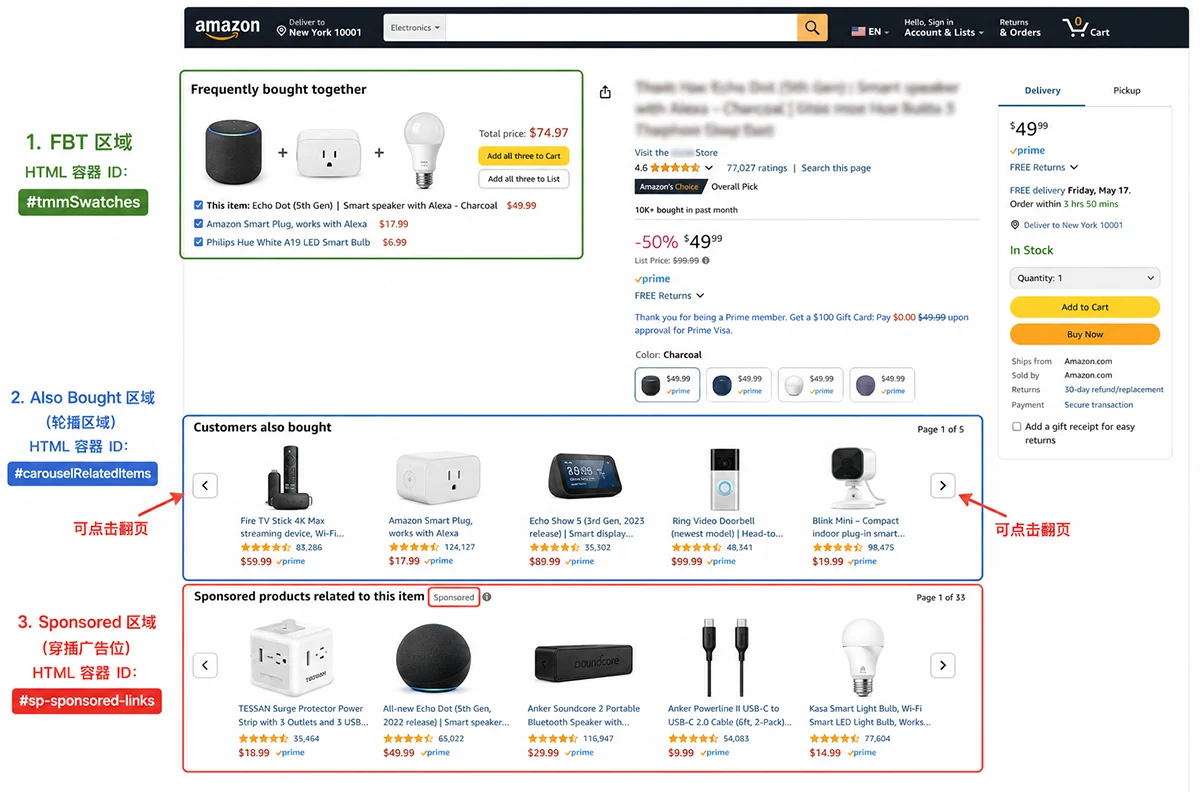
FBT 是亚马逊最古老也是最有价值的关联模块之一。它基于真实的同订单共购行为,只有当相当数量的用户在同一个订单中同时购买了 A 和 B,A 的 FBT 里才会出现 B。这意味着 FBT 关系具有很强的需求关联性——对于消费者来说是「必买搭配」,对于卖家来说是「竞品关联分析」和「捆绑促销选品」的重要依据。
FBT 数据通常展示 2-4 个 ASIN,HTML 容器为 #sims-fbt 或 #frequently-bought-together_feature_div,是服务端渲染的,可在静态 HTML 中直接获取,是六大模块中采集难度最低的。
模块二:Customers Who Bought This Also Bought
这个模块是协同过滤推荐的代表,展示「购买了当前商品的用户还购买了哪些商品」。由于基于购买行为,其相关性比浏览行为更强,通常包含 15-20 个 ASIN 以轮播形式展示。HTML 容器为 #p_dp_sims_btf_1 或 #similarities_feature_div,这是一个轮播(carousel)结构,静态 HTML 只包含首屏 4-6 个 ASIN,获取完整列表需要处理分页。
模块三:Customers Who Viewed This Also Viewed
「浏览后又看了」模块基于页面访问行为,覆盖范围比 Also Bought 更广,会推荐功能相似但不一定是同品牌或同价位的商品,是竞品横向分析的重要数据源。容器为 #p_dp_sims_btf_2 或 #session-sims-feature-div,同样是轮播结构,同样面临首屏数据不完整的问题。
模块四:Similar Items to Consider
这是品类推荐模块,主要展示同品类内功能相近的替代品。对于卖家来说,这里出现了谁,意味着亚马逊的算法认为谁是你的直接竞争对手。容器通常是 #similarities_feature_div 或 #compare-similar-feature-div。
模块五:Sponsored Products(关联广告位)
赞助商品广告会穿插在自然推荐模块中间,HTML 特征是 .s-sponsored-label-info-icon 或 data-component-type="sp-sponsored-result"。区分广告位和自然推荐对竞品广告投放分析非常有价值——知道竞争对手在哪些关键商品下投放了关联广告,可以反推其广告策略。
模块六:Best Sellers in Category(品类榜侧边栏)
部分商品页面会在右侧边栏展示品类 Best Sellers 前几名,这是快速了解品类头部竞争格局的捷径。HTML 容器为 #zg-right-col 或 #browseTree_feature_div 中的相关部分。
六大模块采集难度对比
| 模块 | 渲染方式 | 默认可见数量 | 采集难度 | 数据价值 |
|---|---|---|---|---|
| FBT | 服务端渲染 | 2-4 个 | ★☆☆(低) | 极高(需求关联) |
| Also Bought | 服务端渲染 + 轮播 | 首屏 4-6 个 | ★★☆(中) | 高(购买协同) |
| Also Viewed | 服务端渲染 + 轮播 | 首屏 4-6 个 | ★★☆(中) | 高(浏览竞品) |
| Similar Items | 服务端/JS混合 | 4-8 个 | ★★☆(中) | 中(品类替代品) |
| Sponsored | JS 动态渲染 | 4-8 个 | ★★★(高) | 高(广告竞品) |
| Best Sellers Sidebar | 服务端渲染 | 3-5 个 | ★☆☆(低) | 中(品类榜单) |
如何用 Python 提取亚马逊 Related Products 数据?完整代码
基础环境与 HTML 获取
亚马逊的 Related Products 数据提取首先需要解决 HTML 获取问题。直接用 requests 库请求会触发 Cloudflare 拦截,推荐使用 Playwright + 住宅代理获取静态页面 HTML,或者直接用 Pangolinfo Amazon Scraper API 获取结构化数据(后者不需要处理反爬)。以下代码假设你已经有了目标页面的 HTML 字符串:
from bs4 import BeautifulSoup
from dataclasses import dataclass, field
from typing import Optional
import re

@dataclass
class RelatedProduct:
    """单个关联商品的结构化数据"""
    asin: str
    title: Optional[str] = None
    price: Optional[str] = None
    rating: Optional[float] = None
    review_count: Optional[int] = None
    image_url: Optional[str] = None
    is_sponsored: bool = False
    module: str = ""  # 来源模块标识


def extract_asin_from_element(el) -> Optional[str]:
    """
    从 HTML 元素中提取 ASIN
    亚马逊通常将 ASIN 存储在 data-asin 属性中
    也可能在链接 href 中以 /dp/ASIN 的形式出现
    """
    # 方法一:data-asin 属性(最直接)
    asin = el.get("data-asin", "").strip()
    if asin and len(asin) == 10:
        return asin

    # 方法二:href 中的 /dp/ASIN
    link = el.find("a", href=True)
    if link:
        match = re.search(r"/dp/([A-Z0-9]{10})", link["href"])
        if match:
            return match.group(1)

    return None


def extract_product_card(card_el, module_name: str) -> Optional[RelatedProduct]:
    """
    从单个商品卡片元素提取结构化数据
    适用于大多数关联商品模块的卡片格式
    """
    asin = extract_asin_from_element(card_el)
    if not asin:
        return None

    product = RelatedProduct(asin=asin, module=module_name)

    # 标题:多种选择器兼容
    title_el = (
        card_el.select_one(".a-size-base-plus") or
        card_el.select_one(".a-size-medium") or
        card_el.select_one("[data-rows]") or
        card_el.select_one(".a-truncate-cut")
    )
    if title_el:
        product.title = title_el.get_text(strip=True)[:200]  # 截断过长标题

    # 价格:优先取整数部分 + 小数部分
    price_whole = card_el.select_one(".a-price-whole")
    price_frac = card_el.select_one(".a-price-fraction")
    if price_whole:
        whole = price_whole.get_text(strip=True).replace(",", "")
        frac = price_frac.get_text(strip=True) if price_frac else "00"
        try:
            product.price = f"${whole}.{frac}"
        except Exception:
            pass
    else:
        # 备用:从 .a-offscreen 获取完整价格
        offscreen = card_el.select_one(".a-price .a-offscreen")
        if offscreen:
            product.price = offscreen.get_text(strip=True)

    # 评分
    rating_el = card_el.select_one("[aria-label*='out of 5 stars']")
    if rating_el:
        match = re.search(r"([\d.]+)\s+out of 5", rating_el.get("aria-label", ""))
        if match:
            try:
                product.rating = float(match.group(1))
            except ValueError:
                pass

    # 评论数
    review_el = card_el.select_one("[aria-label$='ratings']") or card_el.select_one("[aria-label$='reviews']")
    if review_el:
        count_text = review_el.get("aria-label", "").replace(",", "")
        match = re.search(r"([\d,]+)", count_text)
        if match:
            try:
                product.review_count = int(match.group(1).replace(",", ""))
            except ValueError:
                pass

    # 图片 URL
    img = card_el.select_one("img")
    if img:
        product.image_url = img.get("src") or img.get("data-src")

    return product
模块一:提取 FBT 数据
def extract_fbt(html: str) -> list[RelatedProduct]:
    """
    提取 Frequently Bought Together(FBT)数据
    FBT 是服务端渲染的,可从静态 HTML 直接获取
    通常包含 2-4 个关联 ASIN
    """
    soup = BeautifulSoup(html, "lxml")
    results = []

    # 尝试两个版本的容器 ID
    container = (
        soup.find(id="sims-fbt") or
        soup.find(id="frequently-bought-together_feature_div")
    )
    if not container:
        return results

    # FBT 的每个商品卡片通常包含 data-asin 属性
    cards = container.find_all(attrs={"data-asin": True})
    seen_asins = set()

    for card in cards:
        asin = card.get("data-asin", "").strip()
        if not asin or asin in seen_asins or len(asin) != 10:
            continue
        seen_asins.add(asin)

        product = extract_product_card(card, module_name="fbt")
        if product:
            results.append(product)

    return results
模块二 & 三:提取 Also Bought / Also Viewed(轮播处理)
def extract_carousel_module(html: str, container_ids: list[str], module_name: str) -> list[RelatedProduct]:
    """
    提取轮播式关联商品模块(Also Bought / Also Viewed / Similar Items)

    核心问题:轮播默认只显示首屏 4-6 个 ASIN,
    通过解析所有 .a-carousel-card 可以获取已加载的完整数量(通常 12-20 个)
    若需要完整列表,需要模拟点击翻页箭头或解析后端 XHR 请求
    """
    soup = BeautifulSoup(html, "lxml")
    results = []
    seen_asins = set()

    container = None
    for cid in container_ids:
        container = soup.find(id=cid)
        if container:
            break

    if not container:
        return results

    # 提取轮播中所有卡片(包括隐藏的下一屏卡片)
    cards = container.select(".a-carousel-card, [data-asin]")

    for card in cards:
        asin = (
            card.get("data-asin", "") or
            extract_asin_from_element(card)
        )
        if not asin or asin in seen_asins or len(str(asin)) != 10:
            continue
        seen_asins.add(asin)

        product = extract_product_card(card, module_name=module_name)
        if product:
            results.append(product)

    return results


def extract_also_bought(html: str) -> list[RelatedProduct]:
    return extract_carousel_module(
        html,
        container_ids=["p_dp_sims_btf_1", "similarities_feature_div", "sp-recommendations-feature-div"],
        module_name="also_bought"
    )


def extract_also_viewed(html: str) -> list[RelatedProduct]:
    return extract_carousel_module(
        html,
        container_ids=["p_dp_sims_btf_2", "session-sims-feature-div", "customers-also-viewed_feature_div"],
        module_name="also_viewed"
    )
模块五:区分 Sponsored 广告和自然推荐
def is_sponsored_product(card_el) -> bool:
    """
    判断关联商品卡片是否为 Sponsored(付费广告)
    通过多种 HTML 特征综合判断,提高准确率
    """
    # 特征一:包含 sponsored 标签图标
    if card_el.select_one(".s-sponsored-label-info-icon, .puis-sponsored-label-info-icon"):
        return True

    # 特征二:data-component-type 属性
    component_type = card_el.get("data-component-type", "")
    if "sponsored" in component_type.lower():
        return True

    # 特征三:卡片内文本包含「Sponsored」
    text_content = card_el.get_text().lower()
    if "sponsored" in text_content[:200]:  # 只检查前200字符,避免误判
        return True

    # 特征四:广告曝光链接(impression URL)
    for link in card_el.select("a[href]"):
        href = link.get("href", "")
        if "aax-us-pdp" in href or "amazon-adsystem" in href:
            return True

    return False


def extract_all_related_products(html: str) -> dict:
    """
    提取页面上所有关联商品模块的数据,统一返回
    对每个 ASIN 打上来源模块标记,并识别是否为广告
    """
    soup = BeautifulSoup(html, "lxml")

    # 在提取过程中补充 is_sponsored 标记
    def with_sponsored_flag(products: list[RelatedProduct], html_ref) -> list[RelatedProduct]:
        soup_ref = BeautifulSoup(html_ref, "lxml")
        for product in products:
            card = soup_ref.find(attrs={"data-asin": product.asin})
            if card:
                product.is_sponsored = is_sponsored_product(card)
        return products

    result = {
        "asin": None,         # 当前商品 ASIN(可从页面提取)
        "fbt": [],
        "also_bought": [],
        "also_viewed": [],
        "related_modules_summary": {}
    }

    # 提取当前页面 ASIN
    main_asin = soup.find(attrs={"data-asin": True})
    if main_asin:
        result["asin"] = main_asin.get("data-asin")

    # 逐模块提取
    result["fbt"] = extract_fbt(html)
    result["also_bought"] = with_sponsored_flag(extract_also_bought(html), html)
    result["also_viewed"] = with_sponsored_flag(extract_also_viewed(html), html)

    # 汇总统计
    result["related_modules_summary"] = {
        "fbt_count": len(result["fbt"]),
        "also_bought_count": len(result["also_bought"]),
        "also_viewed_count": len(result["also_viewed"]),
        "sponsored_in_also_bought": sum(1 for p in result["also_bought"] if p.is_sponsored),
        "unique_asins_total": len({
            p.asin for module in [result["fbt"], result["also_bought"], result["also_viewed"]]
            for p in module
        })
    }

    return result
轮播翻页:获取完整关联列表
轮播模块(Also Bought / Also Viewed)的静态 HTML 通常只包含首屏 4-6 个 ASIN。要获取完整的 15-20 个关联 ASIN,需要处理翻页。以下是用 Playwright 模拟点击轮播箭头的方案:
from playwright.sync_api import sync_playwright
import json

def get_full_carousel_asins(asin: str, proxy_url: str = None) -> dict:
    """
    使用 Playwright 翻动轮播,获取完整关联商品列表
    比静态 HTML 解析多获取 2-3 倍的关联 ASIN

    注意:需要住宅代理才能稳定访问亚马逊
    """
    all_asins = {"also_bought": [], "also_viewed": []}
    carousel_ids = {
        "also_bought": ["p_dp_sims_btf_1", "similarities_feature_div"],
        "also_viewed": ["p_dp_sims_btf_2", "session-sims-feature-div"]
    }

    with sync_playwright() as p:
        browser = p.chromium.launch(
            headless=True,
            proxy={"server": proxy_url} if proxy_url else None
        )
        page = browser.new_page()

        try:
            page.goto(f"https://www.amazon.com/dp/{asin}", timeout=45000, wait_until="domcontentloaded")
            page.wait_for_timeout(3000)  # 等待关联模块异步加载

            for module_name, cids in carousel_ids.items():
                for cid in cids:
                    # 找到轮播容器
                    carousel = page.query_selector(f"#{cid}")
                    if not carousel:
                        continue

                    # 最多翻 5 次(避免死循环)
                    for _ in range(5):
                        # 提取当前可见的 ASIN
                        cards = page.query_selector_all(f"#{cid} [data-asin]")
                        for card in cards:
                            a = card.get_attribute("data-asin")
                            if a and len(a) == 10 and a not in all_asins[module_name]:
                                all_asins[module_name].append(a)

                        # 尝试点击"下一页"按钮
                        next_btn = page.query_selector(f"#{cid} .a-carousel-goto-nextpage")
                        if not next_btn or not next_btn.is_visible():
                            break

                        next_btn.click()
                        page.wait_for_timeout(800)  # 等待轮播动画完成

                    break  # 找到有效容器后跳出内层循环

        finally:
            browser.close()

    return all_asins
亚马逊 Related Products 数据的三大业务场景
场景一:竞品关联网络分析
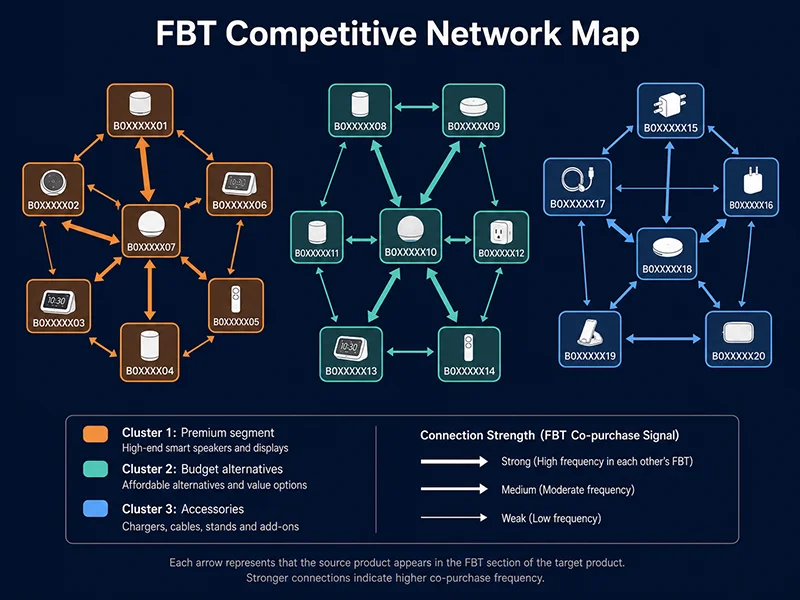
通过系统性采集竞品 ASIN 的 FBT 和 Also Bought 数据,可以构建一个竞品关联图谱——谁和谁频繁被一起购买,意味着在消费者心智中这两个商品存在强关联。对于新品入市的选品决策来说,这比 BSR 数据更有洞察价值:不是看某个品类卖得好,而是看目标消费者的真实购买组合。
举个例子:如果你在考虑进入「蓝牙耳机」品类,采集 Top 50 个竞品的 FBT 数据,会发现某些 ASIN 频繁出现在多个竞品的 FBT 列表里——这很可能是一个被大量用户搭配购买的配件品类(比如耳机清洁套装),这就是关联选品机会。
场景二:广告投放的竞品定向依据
亚马逊的 Sponsored Display 和 Sponsored Products 支持「ASIN 定向」(Product Targeting)——可以直接将广告投放到特定竞品的详情页上。而通过采集竞品的 Also Viewed 数据,可以快速找到与竞品高度相关的同品类 ASIN 列表,作为广告定向的候选池。区分 Sponsored 和自然推荐还有另一个价值:观察哪些广告主在你竞品下投放关联广告,反推竞争格局。
场景三:AI Agent 驱动的自动化竞品研究
对于需要在 AI Agent 工作流中实时获取竞品关联数据的场景,Pangolinfo Amazon Scraper Skill 通过 MCP 协议直接支持关联商品数据的按需拉取。Agent 可以调用一次 Tool Call,传入目标 ASIN,获取结构化的六大模块关联数据,无需了解底层 HTML 解析细节,从而构建「目标 ASIN → 抓取关联商品 → 分析竞争格局 → 生成选品报告」的全自动化研究链路。
对于需要规模化采集(比如批量监控 1000 个竞品 ASIN 的关联变化),Pangolinfo Amazon Scraper API 内置了针对 Related Products 六大模块的解析模板,支持直接指定 fields: ["related_products"] 返回结构化 JSON,当亚马逊调整模块的 HTML 结构时,服务端透明更新,调用方无感知。完整 API 文档参见 docs.pangolinfo.com。
完整整合:批量采集多个 ASIN 的关联商品数据
import json
import time
import logging
from pathlib import Path

logging.basicConfig(level=logging.INFO, format="[%(asctime)s] %(levelname)s: %(message)s")

def batch_extract_related_products(
    asins: list[str],
    html_fetcher,           # 接受 ASIN 返回 HTML 字符串的函数
    output_path: str = "related_products.jsonl",
    delay_range: tuple = (8, 20)
) -> list[dict]:
    """
    批量提取多个商品的关联数据

    Args:
        asins: 目标 ASIN 列表
        html_fetcher: 接受 ASIN、返回 HTML 字符串的可调用对象
                     可以是 Playwright 封装函数或 Pangolinfo API 调用
        output_path: 输出 JSONL 文件路径(断点续存)
        delay_range: 请求间隔随机范围(秒),避免触发反爬

    Returns:
        所有成功提取的结果列表
    """
    import random
    output = Path(output_path)
    results = []
    errors = []

    for i, asin in enumerate(asins, 1):
        logging.info(f"[{i}/{len(asins)}] 开始处理 ASIN: {asin}")

        try:
            html = html_fetcher(asin)
            if not html:
                logging.warning(f"  ASIN {asin}: 获取 HTML 失败")
                errors.append({"asin": asin, "error": "empty_html"})
                continue

            data = extract_all_related_products(html)
            data["scraped_at"] = time.strftime("%Y-%m-%dT%H:%M:%SZ", time.gmtime())

            results.append(data)

            # 断点续存:每次成功后追加写入
            with open(output, "a", encoding="utf-8") as f:
                f.write(json.dumps(data, ensure_ascii=False) + "\n")

            logging.info(
                f"  ✓ FBT: {len(data['fbt'])} | "
                f"Also Bought: {len(data['also_bought'])} | "
                f"Also Viewed: {len(data['also_viewed'])}"
            )

        except Exception as e:
            logging.error(f"  ASIN {asin} 处理失败: {e}")
            errors.append({"asin": asin, "error": str(e)})

        # 随机间隔,避免固定时序被检测
        if i < len(asins):
            delay = random.uniform(*delay_range)
            logging.info(f"  等待 {delay:.1f}s...")
            time.sleep(delay)

    # 输出汇总报告
    logging.info(f"\n=== 完成 ===")
    logging.info(f"成功: {len(results)}/{len(asins)} | 失败: {len(errors)}")
    logging.info(f"结果保存至: {output}")

    return results


# ── 使用示例(配合 Pangolinfo API 作为 html_fetcher)──

def pangolinfo_fetcher(asin: str, api_key: str, marketplace: str = "US") -> str:
    """
    使用 Pangolinfo Scraper API 获取已解析的关联商品数据
    无需处理 HTML 解析、代理、反爬,直接返回结构化 JSON
    """
    import requests

    resp = requests.post(
        "https://api.pangolinfo.com/v1/amazon/product",
        headers={"Authorization": f"Bearer {api_key}", "Content-Type": "application/json"},
        json={
            "asin": asin,
            "marketplace": marketplace,
            "fields": ["related_products", "fbt", "also_bought", "also_viewed"]
        },
        timeout=30
    )
    resp.raise_for_status()
    return json.dumps(resp.json().get("data", {}))


# 实际运行
if __name__ == "__main__":
    target_asins = [
        "B0CHP7BPYQ",
        "B09G9FPHY6",
        "B08N5WRWNW",
    ]

    # 方案 A:自建 HTML 获取(需要配合 Playwright + 住宅代理)
    # results = batch_extract_related_products(target_asins, my_playwright_fetcher)

    # 方案 B:使用 Pangolinfo API(推荐,无需维护爬虫基础设施)
    API_KEY = "your_pangolinfo_api_key"
    fetcher = lambda asin: pangolinfo_fetcher(asin, API_KEY)
    results = batch_extract_related_products(target_asins, fetcher)

    print(f"提取完成,共 {len(results)} 个 ASIN 的关联商品数据")
常见问题解答
亚马逊 Related Products 数据包含哪些模块?
主要分六类:FBT(频繁一起购买)、Also Bought(购买协同过滤)、Also Viewed(浏览协同过滤)、Similar Items(品类推荐)、Sponsored Products(关联广告)、Best Sellers 侧边栏。每个模块的渲染方式和数据量不同,FBT 通常 2-4 个,轮播模块可达 15-20 个 ASIN。
亚马逊 FBT 数据的 HTML 选择器是什么?
FBT 容器为 #sims-fbt 或 #frequently-bought-together_feature_div,是服务端渲染的,静态 HTML 可直接获取。每个关联商品卡片包含 data-asin 属性,可批量提取。是六大模块中采集难度最低的。
Customers Also Viewed 和 Also Bought 有什么区别?
Also Bought 基于购买行为协同过滤(同订单共购),相关性更强;Also Viewed 基于浏览行为,范围更广,适合发现横向竞品。两者都是轮播结构,静态 HTML 只能获取首屏 4-6 个 ASIN,完整列表需要处理轮播翻页。
如何区分 Sponsored 广告和自然推荐?
Sponsored Products 的 HTML 特征包括:.s-sponsored-label-info-icon、data-component-type="sp-sponsored-result"、广告曝光链接(含 amazon-adsystem)。建议对每个关联 ASIN 都记录 is_sponsored 字段,区分广告位对竞品广告分析有重要价值。
为什么亚马逊 Related Products 采集推荐用 API?
自写爬虫需要处理:Cloudflare + HUMAN Security 反爬(要求住宅代理 + 行为模拟)、轮播翻页(获取完整关联列表)、HTML 结构季度性变化。Pangolinfo Amazon Scraper API 内置全模块解析模板,直接返回结构化 JSON,维护成本极低。
总结:亚马逊 Related Products 数据采集的工程选择
亚马逊关联商品数据的价值不应被低估——FBT 揭示真实需求关联,Also Viewed 呈现浏览竞品格局,Sponsored 反映广告竞争动态。六大模块各有其数据价值,也各有其采集挑战,从服务端渲染可直接获取(FBT、Best Sellers 侧栏),到需要轮播翻页(Also Bought、Also Viewed),再到依赖 JavaScript 动态渲染的 Sponsored 广告位。
本文提供的 Python 代码覆盖了主要模块的解析逻辑,适合验证可行性和小规模采集。对于需要持续监控大量竞品 ASIN 的关联变化、或者在 AI Agent 工作流中实时获取关联数据的场景,Pangolinfo Amazon Scraper API 是更具工程可持续性的选择。
完整 API 文档和关联商品字段说明:docs.pangolinfo.com
立即免费试用 Pangolinfo Amazon Scraper API,批量获取六大关联商品模块结构化数据 → 开始使用